
What is closed testing, and why is Google making you do it?
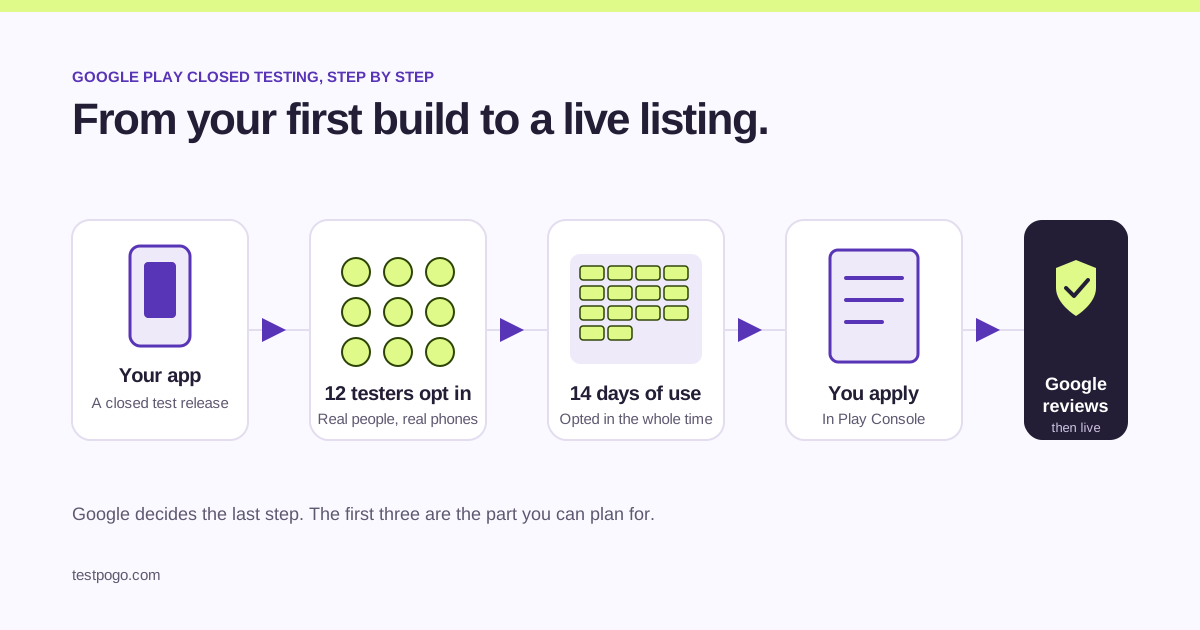
Closed testing is a private release of your app that only invited people can install. Since late 2023, Google asks every new personal developer account to run one before publishing: at least 12 testers, opted in for 14 days in a row. The idea is simple. Google wants proof that real people have used your app before it goes live to everyone.
It catches most first-time developers by surprise. You finish the app, upload the build, and Play Console tells you production is locked until the test is done. This guide walks through what Google actually asks for and how to get through it without losing weeks.
Who has to do this?
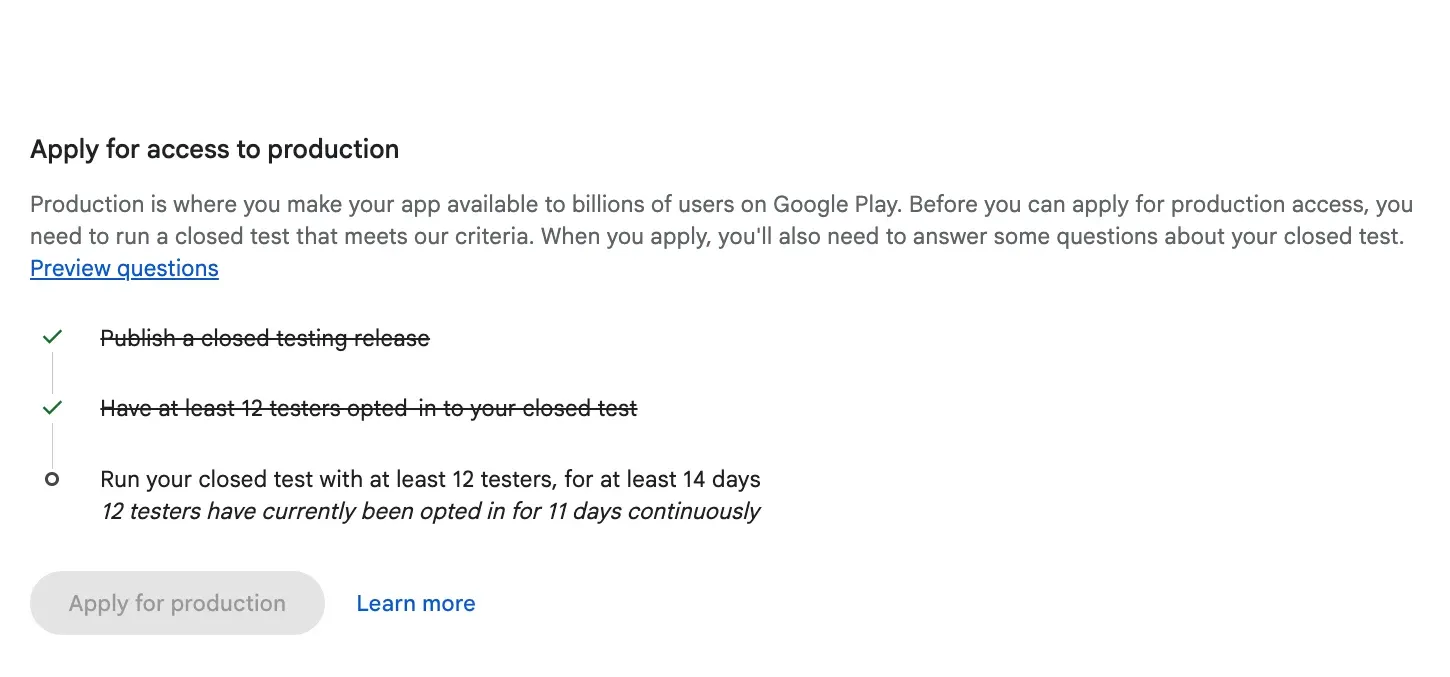
Not sure which you are? Open your app’s dashboard in Play Console. If the requirement applies to you, Google shows it there, with a checklist, before you can choose production.
- Personal developer accounts created after November 2023.
- Every new app on one of those accounts, not just the first.
- Not organisation accounts.
- Not updates to an app that is already live.
What counts as a tester?
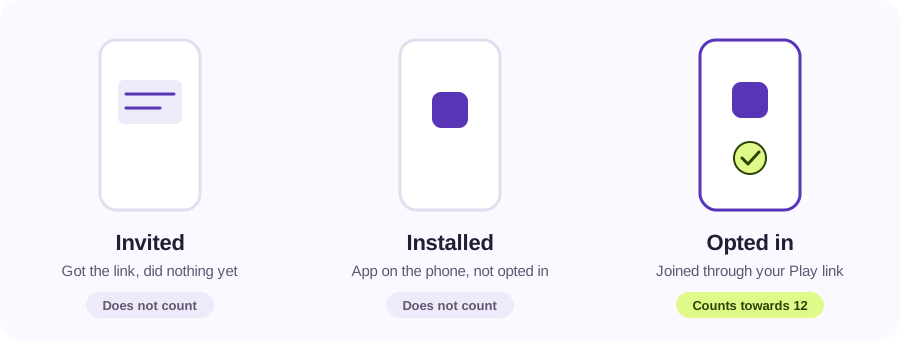
A tester is someone who joined your closed test through your opt-in link and stayed opted in. Sending someone the link is not enough. Sending them the APK is not enough either. They have to open your Play Store testing page, accept the invitation, and keep the app installed.
You can list testers by email or by Google Group. A Google Group is much easier: anyone who joins the group is automatically in the test, and you never have to edit a list in Play Console.
How do the 14 days work?
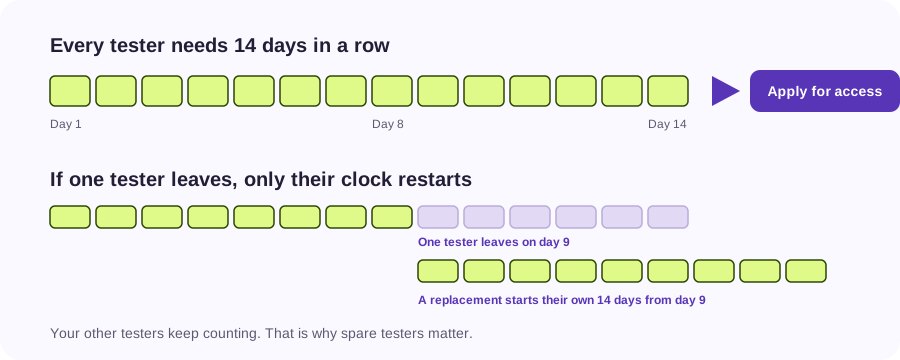
Google counts 14 days in a row for each tester, starting when they opt in. All 12 have to be opted in at the same time for the whole period. If a tester leaves on day 9 and you replace them, the replacement’s 14 days start on day 9. Everyone else keeps counting.
This is why having more than 12 helps. With 15 testers you can lose a couple along the way and still be over the line when the two weeks end. It is the single biggest reason people end up running the test twice.
What do testers have to do during the test?
Keep the app installed, stay opted in, and actually use it. Google looks at engagement when it reviews your application, and it has said that too little engagement is a reason it asks developers to keep testing.
So give your testers something to do. A short list of tasks, a place to report problems, and a build that does not crash on the first screen. Testers who open the app once and forget it are not much use to you or to Google.
What happens after the 14 days?
Once the 14 days are up, Play Console lets you apply for production access. The application asks about your closed test, about your app, and whether you think it is ready. Answer in your own words: who tested it, what they did, what you changed because of it. If you used a service like TestPogo to find testers, say so.
Google then reviews your answers and either grants production access or asks you to keep testing. Once you have access, you publish the way everyone else does.
What if Google asks me to keep testing?
It happens, and it is not the end of the road. Testing-related reasons include too few opted-in testers and too little engagement. Other rejection reasons require different fixes. Fix the one that applies: get more people opted in, or give the ones you have real reasons to open the app every day. Then apply again.
If you would rather not run it alone a second time, TestPogo’s 15-tester plan comes with a written feedback report you can quote in the application, with no rejection-related refund or retest included.
Where do I find the links I need?
Add the shared TestPogo group to your closed track and copy the Play opt-in link. Complete the access checklist after payment.
- Use the TestPogo group address confirmed during onboarding, or provide your existing tester group.
- Your opt-in link: in Play Console go to Testing, then Closed testing, then Testers. Add your Google Group there and copy the “join on the web” link.
- Publish your closed testing release, then open the opt-in link in a private browser window to make sure it works.
Common questions
Does installing the app count as opting in?
No. Installing the app is not the same as opting in. A tester has to accept the invitation on your Play Store testing page, then install the build from there. Only opted-in testers count towards the 12.
Can friends and family be my testers?
Yes. Friends and family count as testers if they opt in through your link and keep the app installed for the full 14 days. Count people who will actually use the app, not phones you happen to have access to.
Do testers have to be in a specific country?
Google does not name a country. But your closed test only reaches people in the countries you enabled for it, so make sure your testers live in one of them.
Does uninstalling the app reset the 14 days?
Uninstalling alone does not reset the 14 days, but opting out does. If a tester leaves the test and rejoins, their 14 days start again from the day they rejoin.
Can I use an emulator or a second phone as a tester?
No. An emulator or a second phone is not a tester. Google counts opted-in Google accounts on real devices, and fake testers put your developer account at risk.
How long does Google take to decide?
Google does not publish a fixed time for the production access review. Plan for days rather than hours, and keep your testers opted in while you wait in case Google asks you to continue testing.
What is a group of app testers called?
In Play Console it is a testing track: internal, closed or open. The people on it are simply your testers, and you add them as an email list or a Google Group. There is no special name for the group, so if you see “testers list” or “tester group”, it means the same thing.
What is the difference between internal testing and closed testing?
Internal testing is for up to 100 people you add by email, with no review and instant updates, and it does not count towards the 12-tester requirement. Closed testing is the track Google counts: at least 12 opted-in testers for 14 days. Open testing lets anyone join from the Play Store and comes after you have production access.
Can a service like TestPogo run the closed test for me?
A service can supply and coordinate the testers, and TestPogo does exactly that: 15 real people on real Android phones for 14 days, from $12. You still own the app, the Play Console account and the application to Google.
15 real testers, ready within 48 hours.
From $5 per app. Pick a plan and share two links.