
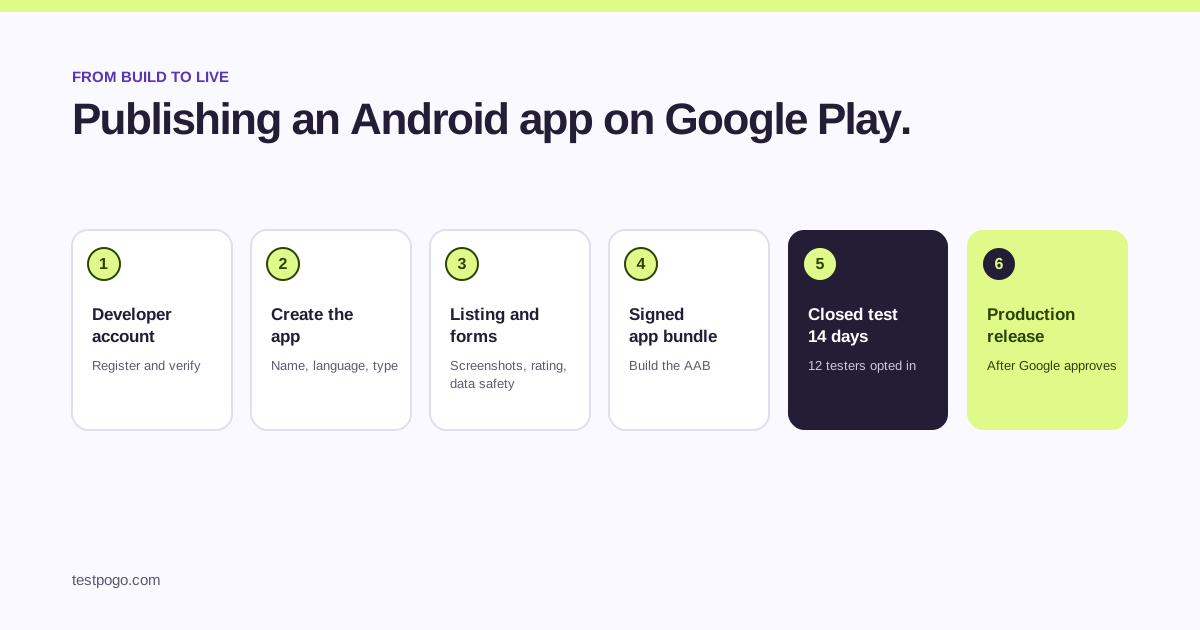
What does publishing on Google Play involve?
Six steps. Set up a developer account, create the app in Play Console, fill in the store listing and the policy forms, upload a signed app bundle, run the closed test that new personal accounts have to pass, then apply for production access and release. None of them is hard on its own. The surprise for most first-time developers is step five, because it takes 14 days and 12 other people.
This guide walks through all six in order, with the thing that usually goes wrong at each one.
Step 1: set up your Google Play developer account
Go to Play Console, sign in with the Google account you want to publish under, pay the one-time registration fee and complete identity verification. Choose between a personal and an organisation account carefully: organisation accounts need business documents, and personal accounts created after November 2023 have to run a closed test with 12 testers for 14 days before they can publish.
Verification can take a few days. Start it before the app is finished so it is not the thing you are waiting on.
Step 2: create your app in Play Console
Click Create app, give it a name, pick a default language, say whether it is an app or a game and whether it is free or paid, and accept the declarations. The name can change later; free to paid cannot, so decide that now.
Step 3: fill in the store listing and the forms
The store listing is what people see: app name, short and full description, icon, feature graphic and screenshots for each device type you support. The forms are what Google needs before it will review anything: the content rating questionnaire, the data safety section, a privacy policy URL, the ads declaration, target audience and content, and app access details if any part of the app needs a login.
- Write the privacy policy first; several forms ask for its URL.
- Answer data safety from what the app actually collects, including through SDKs.
- If the app needs a login, give reviewers a working test account in the app access section.
- Screenshots need to show the current build, not a mockup.
Step 4: build a signed app bundle
Google Play requires an Android App Bundle, the .aab format, for new apps. In Android Studio choose Build, then Generate Signed Bundle, create or choose a keystore, and keep that keystore safe: it is how you prove future updates come from you. On upload, Play App Signing takes over the key that reaches users’ phones, and Google builds the APKs from your bundle.
The bundle is smaller than an APK because Google only ships each device the parts it needs. You can still build an APK for local testing; you cannot upload one as a new app.
Step 5: test on the internal track, then run your closed test
Upload the bundle to internal testing first. It goes to up to 100 people you add by email with no review, so it is the fastest way to see the real build on a phone. Fix what breaks.
Then create a closed testing release. If your personal account was created after November 2023, this is the step that gates everything: at least 12 testers opted in for 14 days in a row before you can apply for production access. Add your testers as a Google Group, share the opt-in link, and give them something to do each day. Our closed testing guide covers what counts and what resets the clock, and the guide to finding testers compares the ways to reach 12.
Step 6: apply for production access and release
After the 14 days, Play Console shows the production access application. It asks about your closed test, your app and whether it is ready; answer in your own words with real numbers. Once Google grants access, create a production release, choose the countries, and decide whether to roll out to everyone at once or to a percentage of users first. Google reviews the release before it goes live.
Read our guide to applying for production access before you fill in the form. Vague answers are the most common reason Google asks developers to keep testing.
How long does the whole thing take?
Plan for three to four weeks from a finished build to a live listing, most of it the closed test. Developers who start recruiting testers on day one of the two weeks rather than at the end are the ones who hit that.
| Step | Typical time | What decides it |
|---|---|---|
| Developer account and verification | Days | How quickly you can provide documents |
| Creating the app, listing and forms | A day, if the privacy policy exists | Screenshots and the data safety form |
| Signed bundle and internal test | Hours | Your build |
| Closed test | 14 days minimum | Having 12 testers opted in from day one |
| Production access review | Days | The quality of your answers and your test |
| Production release review | Days | Policy compliance of the listing and app |
What trips first-time developers up?
- Starting the closed test with 8 friends and finding out that 8 is not 12.
- Testers who install but never opt in through the Play link, so they do not count.
- A privacy policy URL that returns a 404.
- Data safety answers that do not match what an SDK collects.
- Applying for production access with template answers.
- Losing the upload keystore. Keep it backed up and out of the repository.
Common questions
What is an AAB file?
An Android App Bundle, the publishing format Google Play requires for new apps. It contains your compiled code and resources, and Google builds the APKs each device downloads from it.
Can I upload an APK instead of an app bundle?
Not for a new app on Google Play. You can still build APKs for local testing and for stores that accept them, but Play Console needs a signed .aab.
How much does it cost to publish on Google Play?
Google charges a one-time registration fee for the developer account; check Play Console for the current amount in your country. There is no charge per app or per release.
Can I skip the closed test?
Not on a personal developer account created after November 2023. Google requires 12 testers opted in for 14 days before you can apply for production access. Organisation accounts and apps that are already live are treated differently.
How long does Google take to review a release?
Google does not publish a fixed time. Plan for days rather than hours for both the production access review and the release review, and longer around holidays.
What is a staged rollout?
Releasing to a percentage of users first, then increasing it. It lets you catch a crash on 5% of users instead of 100%. You choose the percentage when you create the production release.
Do I need 12 testers if I already have an app live?
No. The 12-tester requirement applies to new apps on personal accounts created after November 2023. Updates to an app that is already in production are not affected.
15 real testers, ready within 48 hours.
From $5 per app. Pick a plan and share two links.